500 MARKETING · PRACTICAL SETUP GUIDE
A WhatsApp click tells you someone opened a conversation. It does not tell you whether they booked, attended or paid. This guide shows how to connect those outcomes to your original advertising enquiry, so you can measure the customers your campaigns actually generate.
Built for non-medical spas, salons and other appointment-based service businesses. You can begin with a private lead ledger and a daily import; a CRM is helpful but not essential. The website-to-lead connection requires an integration or developer implementation.
By 500 Marketing · Updated 28 October 2026 · Original explanatory diagrams, not account screenshots.
Want the blank templates and a printable PDF of this guide? Get the free Tracking Starter Kit.
In this guide: Choose your route · Define success · Lead reference · Reception process · Conversion action · Event feed · Testing · FAQ
Choose your route: GCLID import or enhanced conversions for leads
| Your starting point | Recommended approach | What must exist |
|---|---|---|
| Website → WhatsApp; no form | GCLID-based offline event import through Data Manager | A saved click ID linked to a short reference carried into WhatsApp. |
| Website form collects email or phone | Enhanced conversions for leads, plus click IDs where available | Eligible first-party data captured by the Google tag and linked to the later outcome. |
| Existing CRM / booking system | Use its supported conversion connection if it preserves attribution | Reliable lead IDs, event times, consent handling and outcome updates. |
| Ads send people directly to WhatsApp | Do not apply this website-capture method unchanged | A supported direct-messaging integration with proven matching, or a website landing step. |
Google recommends enhanced conversions for leads where eligible customer data can be collected. The click-ID route is a practical starting point when you cannot collect that data on your website. Neither route guarantees that every customer will match.[2][7]
Before you begin
- Google Ads admin access and permission to edit your website or tag container.
- A working landing page, WhatsApp Business number and booking or reception process.
- A private Google Sheet or CRM with an owner responsible for data quality.
- A developer or integration specialist for capture, reference creation and server-side record storage.
- A documented customer-data and consent approach appropriate to your business and visitors.
Step 1. Decide what counts as success
Write the definition before creating tags. A useful setup separates initial contact from a qualified enquiry and a paid outcome. Use definitions your receptionist can apply consistently.
| Stage | Suggested definition | How to treat it |
|---|---|---|
| WhatsApp click | A visitor presses a website WhatsApp button. | Keep as an enquiry-intent metric; it is not proof a message was sent. |
| Qualified Lead | An actual enquiry meets your agreed service, location and purchase-intent criteria. | Potential bidding stage when paid events are too sparse or delayed. |
| Booked | An appointment is confirmed in the booking system. | Operational stage; do not label it revenue. |
| Attended | The customer checks in or completes the visit. | Useful operational stage; still separate from payment. |
| Paid Appointment | A qualifying visit has been paid for under your agreed revenue policy. | Business outcome; store actual event time and collected value. |
Create a “Qualified Lead” and a “Paid Appointment” action if you need to measure both. Google provides qualified-lead and converted-lead goal categories for deeper funnel outcomes.[3]
For a new-customer acquisition campaign, decide whether the paid action means the first paid visit only. Keep repeat visits separate if including them would distort acquisition reporting. Treat deposits, final balances and refunds consistently rather than counting the same appointment as several full sales.
Step 2. Enable auto-tagging and protect the click ID
- In Google Ads, open Admin → Account settings → Auto-tagging.
- Enable “Tag the URL that people click through from my ad” and save.
- Check that website redirects preserve the
gclidquery parameter. - Ask your developer to store the available click identifier with the correct lead, without changing its case.
Auto-tagging adds advertising click information to landing URLs. UTMs are useful reporting labels, but are not a replacement for a Google click ID in this import route.[1][2]
The capture must survive a visitor moving from the landing page to another page before clicking WhatsApp. It should follow your consent implementation and retention policy, preserve a valid existing ad identifier when no new ad click exists, and use a documented rule when a later ad click arrives.
Step 3. Create a private lead record before opening WhatsApp
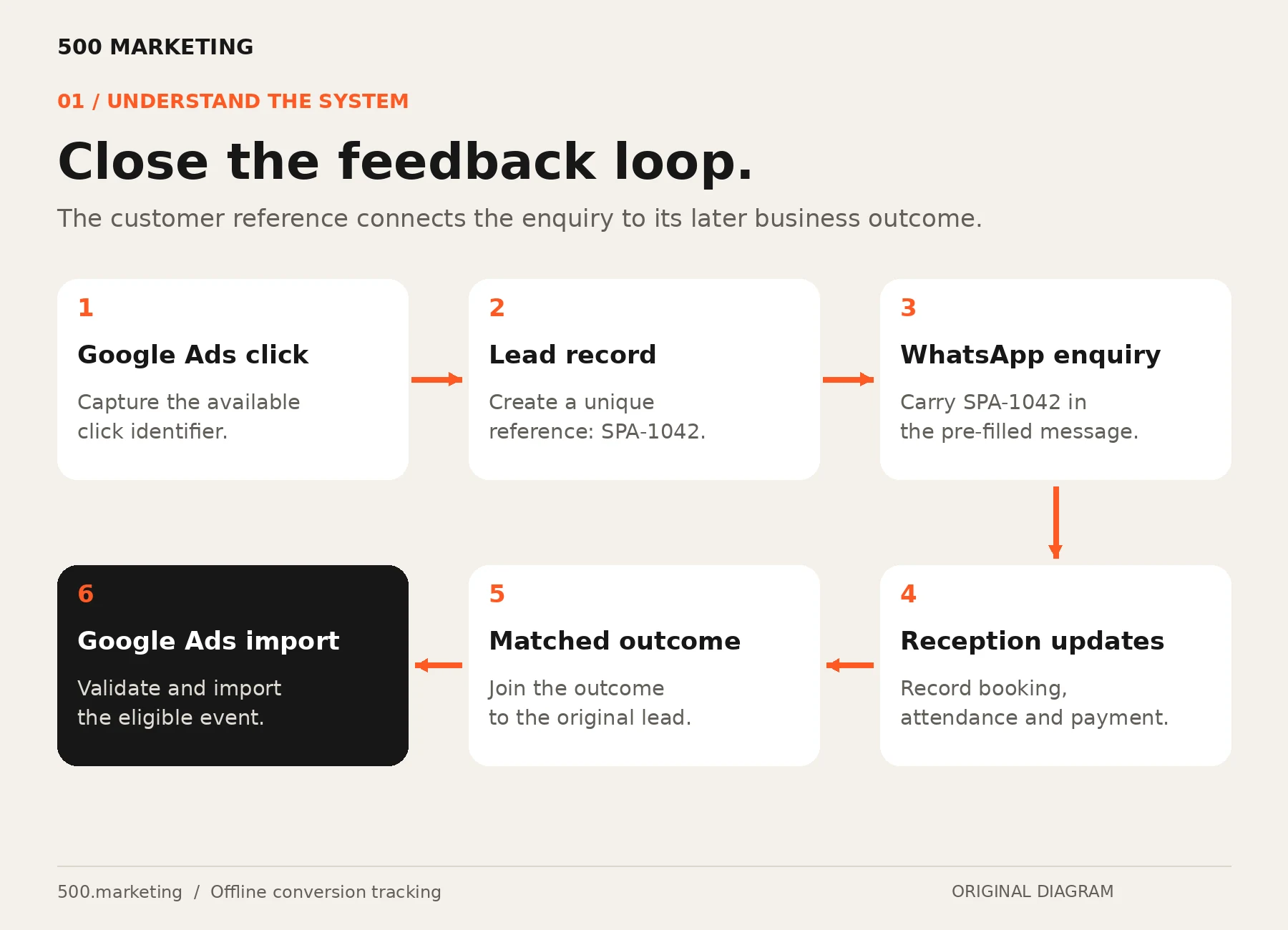
The lead reference joins the online interaction to the booking. Use a server-generated, unpredictable identifier in production. The shorter SPA-1042 shown here is an illustration only.
- The visitor clicks the booking or WhatsApp button.
- Your backend creates or retrieves the correct enquiry record and saves its attribution data.
- The backend returns the lead reference.
- The website opens WhatsApp with that reference in a pre-filled message.
Only proceed to the chat after the save is confirmed, or show a usable fallback and log the capture failure. Repeated clicks should not silently create duplicate customer records. Keep customer data and endpoint credentials out of public page source.
Developer handover: minimum record
lead_ref: SPA-1042  [illustrative]
created_at: 2026-10-28T10:00:00+04:00
gclid: captured identifier, if available
landing_url: original landing URL
utm_source / utm_medium / utm_campaign: if available
consent_status: actual recorded state
status: Enquiry
booking_id: populated when bookedWhere other supported identifiers such as wbraid or gbraid are available, preserve them separately and confirm support in your chosen connector. Do not rename them as GCLIDs. A browser cookie or Conversion Linker tag alone does not create your private lead ledger.
Step 4. Carry the reference into the WhatsApp message
Use this message structure, replacing the reference dynamically for each saved enquiry:
Hi, I would like to book an appointment.
My reference is SPA-1042.
A click-to-chat link uses your business number in international digits and a URL-encoded message:[13]
https://wa.me/YOUR_INTERNATIONAL_NUMBER?text=Hi%2C%20I%20would%20like%20to%20book%20an%20appointment.%20My%20reference%20is%20SPA-1042.Replace the number placeholder and the example reference. Do not use one static reference across your website. Keep the Google click ID in your private record rather than exposing it in the customer message.
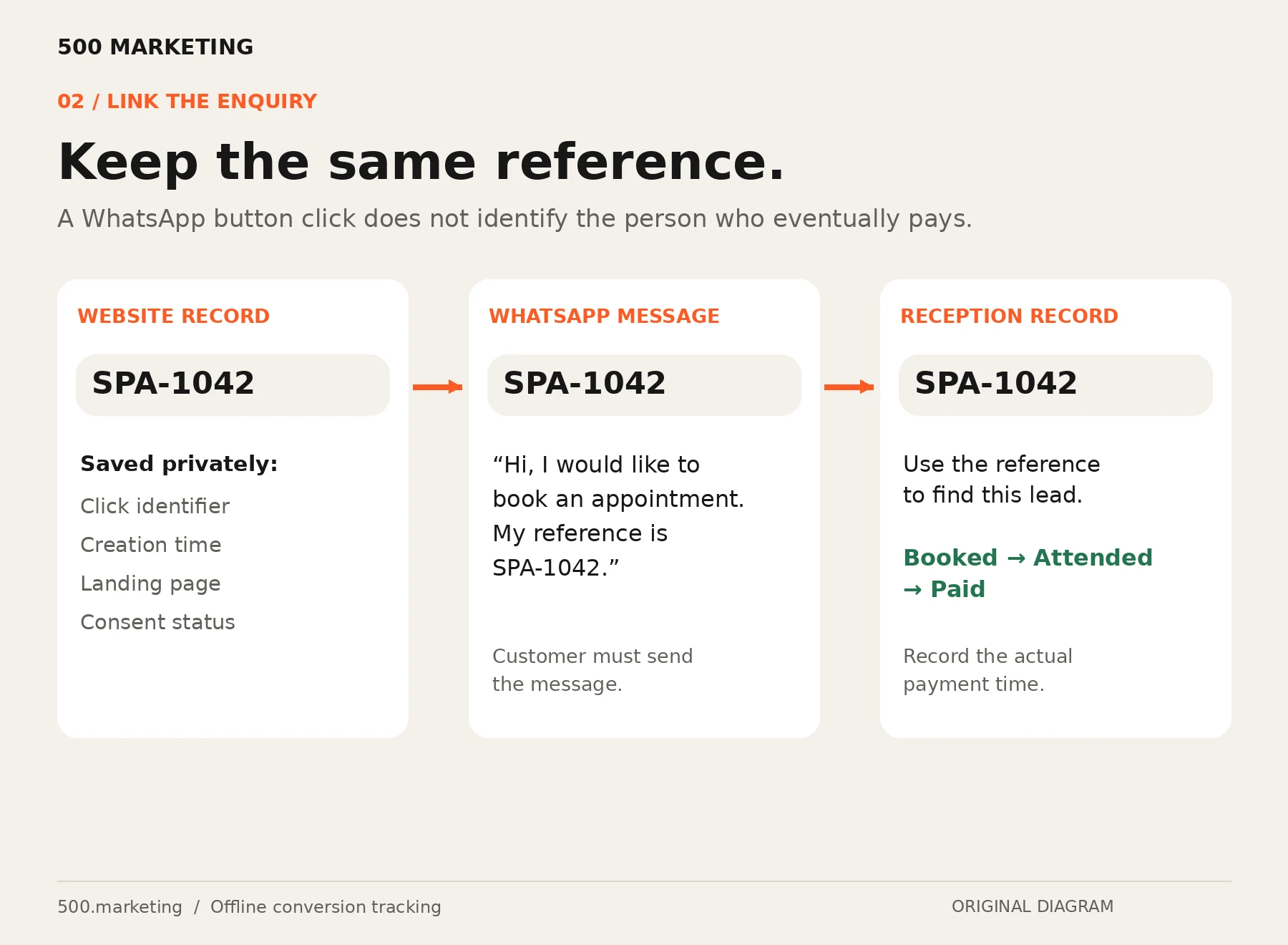
Opening the chat does not send the message. The visitor may edit or remove the reference, switch devices or abandon the chat. Reception should capture the reference when present and ask for the booking reference when it is missing. If you cannot match the enquiry reliably, leave it unmatched rather than guessing.
A WhatsApp Business Platform webhook can automate capture of incoming messages and references. The standard Business app can support a manual workflow. These are different implementations; a website button alone does not read WhatsApp conversations.
Step 5. Give reception a simple outcome process
Use one row per enquiry in the operational ledger. Link the booking ID when an appointment is made. Record a timestamp when each stage actually happens; do not overwrite all stages with the latest status.
- When a message arrives: find the reference and confirm this is a real enquiry.
- When qualified: record the qualified time using your agreed definition.
- When booked: link the appointment and scheduled time.
- When attended and paid: record those outcomes, the collected amount, currency and transaction or booking ID.
- At the end of each shift: resolve incomplete records, cancellations and unmatched enquiries.
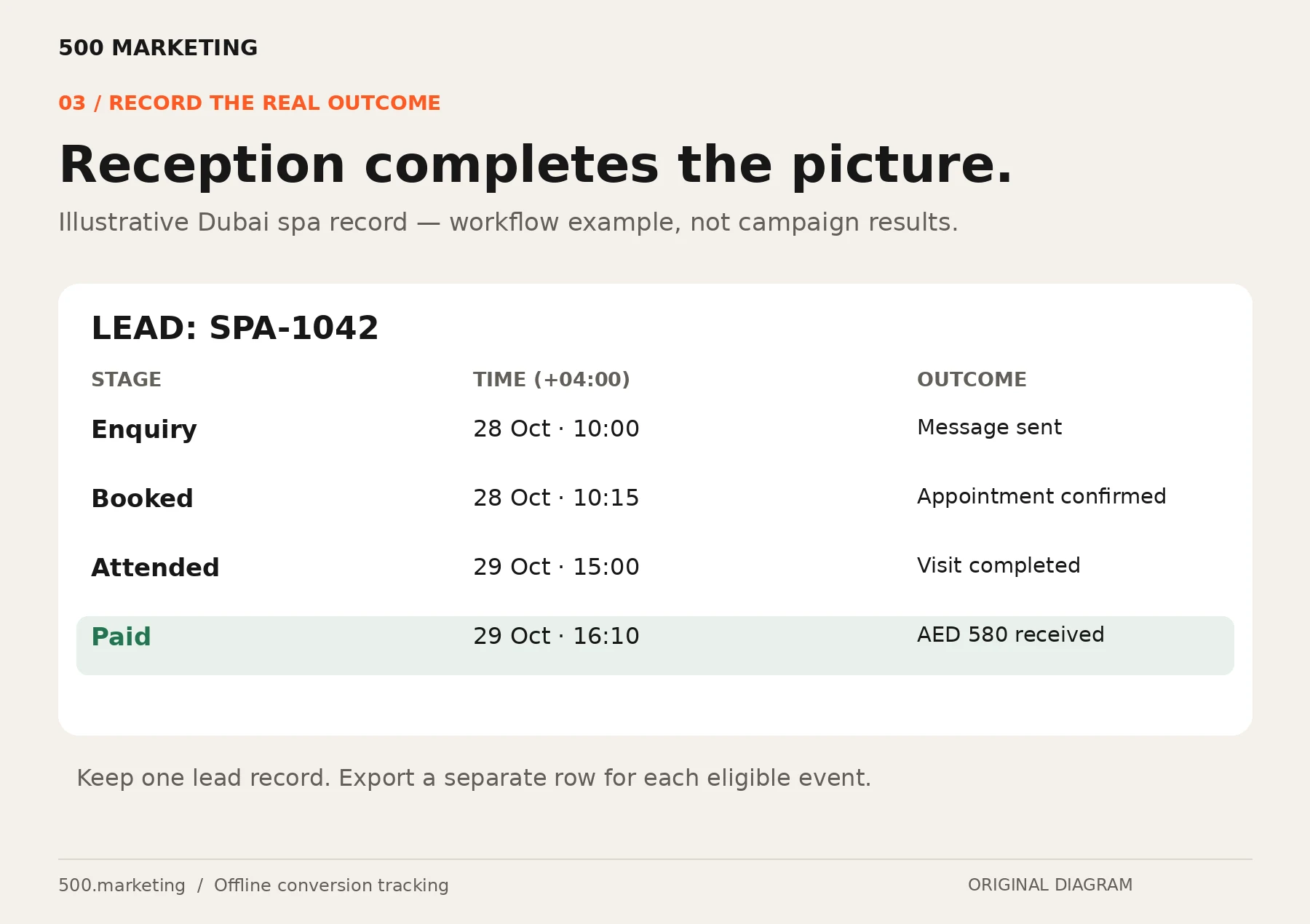
Give reception editing access only where needed. Protect attribution columns from accidental changes. The marketing owner should check that staff record outcomes every day; automatic imports cannot repair missing reception updates.
Step 6. Create the offline conversion action
- Open Goals → Conversions → Summary → Create conversion action.
- Choose the offline source. Depending on your account interface, this may appear as Conversions offline or Import → CRMs, files or other data sources.
- Create Paid Appointment using a category that represents the completed customer outcome. Create Qualified Lead separately if needed.
- Connect a data source, or return to the connection setup in the next step. An action without a source does not receive offline events.
- Start the new action as Secondary while validating. Keep a record of its name, category, counting rule, value settings and conversion window.
Google’s setup separates the conversion action from the source that provides its events. Interface wording can vary; follow the source and goal rather than relying on an old screenshot.[2]
Recommended design: count qualified enquiries once per ad interaction; choose the paid-action counting rule to match your first-visit or transaction definition. Set values from actual collected revenue where available, with a consistent tax and refund policy. Choose a supported window that covers your real booking delay.
Step 7. Build an event feed and connect Google Sheets
Keep the operational ledger private and separate from the import feed. The feed contains one row per eligible event. A customer who qualifies and later pays can produce two rows linked to different actions; an enquiry that has not paid must not enter the paid feed.
For Google Sheets, put headers on the first row and the event feed on the first sheet of the connected file. Use a separate file for reception if that avoids exposing more customer information than necessary.[4]
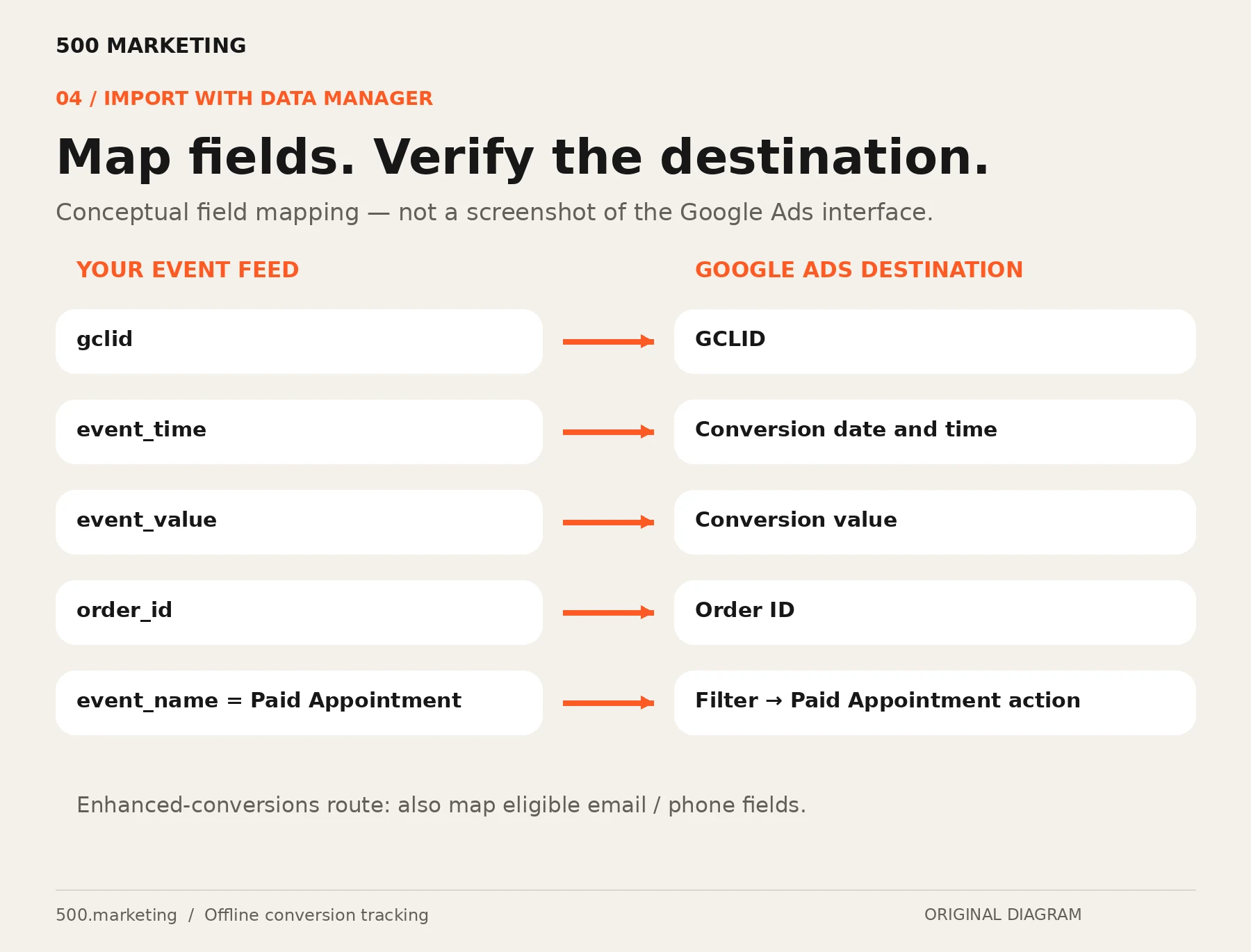
| Your field | Purpose / mapping |
|---|---|
| gclid | GCLID for this event; preserve the genuine captured value. |
| event_name | Filter to the intended action, such as Paid Appointment. |
| event_time | Conversion date and time: actual outcome time, with timezone. |
| event_value | Conversion value, using the agreed revenue definition. |
| currency | Keep explicit internally; configure supported currency mapping or destination currency settings. |
| order_id | Stable transaction/event ID, useful for deduplication and later adjustments. |
| event_source | Set the supported source to IN STORE for an in-person paid visit. |
| email / phone | Enhanced-conversions fields only where appropriate and supported. |
For a Dubai payment at 16:10, an unambiguous example is 2026-10-29T16:10:00+04:00. Preserve the payment time when retrying an import; do not replace it with the current time. Data Manager accepts timezone-aware timestamps and supports field transformations.[5]
- Open Tools → Data manager and connect Google Sheets, or connect it while creating the conversion action.
- Select the Conversions use case, not Audiences / Customer Match. Authorise access with the appropriate account.
- Select the event-feed file. Filter to the intended event and eligible rows, such as
event_name = Paid Appointment. - Map the source columns to destination fields. Confirm the conversion action and currency treatment.
- Review the preview, correct rejected rows and run the import. Schedule a daily refresh after reception data is updated.
The connection supports field mapping, filters and scheduling. Use a dedicated connection for each conversion event, even when two filtered connections read the same source file.[6]
Step 8. Add enhanced conversions where eligible
If your website collects customer email or phone, configure the Google tag or GTM to collect eligible user-provided data at the successful lead event. Use the same identifying data in the later offline import, alongside click IDs where available.[7]
- Confirm eligibility, customer-data terms and your consent implementation.
- Identify the successful form event and the fields that actually identify the lead.
- In GTM, configure user-provided data using an appropriate supported method. For phone collection, use manual or code configuration rather than relying on automatic email detection.
- Verify the data in Tag Assistant / preview, publish the container and check diagnostics.
- Map the corresponding user-provided fields in Data Manager; keep click IDs when available.
The GTM guide covers the Conversion Linker and user-provided-data configuration. A GTM tag cannot read a phone number from inside WhatsApp after a visitor leaves your site.[8]
Data Manager can normalise and SHA-256 hash mapped customer fields. Follow its input expectations; do not double-hash. A custom HMAC lead key or the last four phone digits is not a replacement for the supported Google identifier.[5]
Step 9. Test the complete journey
| Test | Pass condition |
|---|---|
| Website capture | A synthetic test identifier survives redirects and is linked to the saved reference. |
| WhatsApp handoff | The correct dynamic reference appears in the message; reception can find it. |
| Real outcome | A test booking updates the right lead without changing its original attribution. |
| Attribution validation | A genuine eligible ad interaction and genuine outcome can be traced through the import. |
| Import validation | The correct action receives the correct event time, value and identifier. |
| Duplicate replay | An unchanged previously imported event is not counted as a new event. |
| Failure cases | Missing reference, no click ID, denied consent, cancellation and retry each have a defined treatment. |
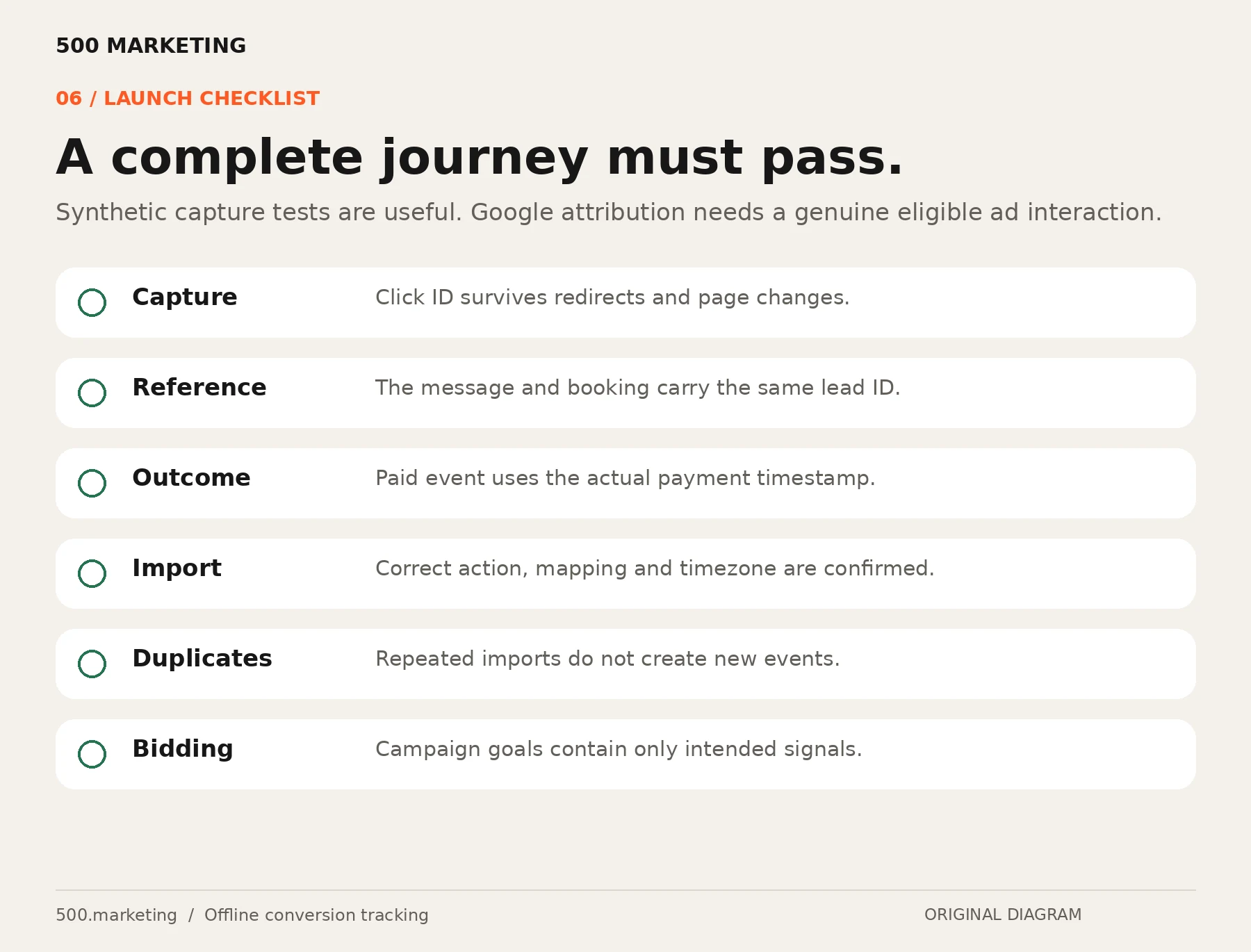
Separate “received by the connector” from “attributed to an ad”. Not every valid business event will become an attributed conversion. Check imports, diagnostics and reports by conversion action. Compare the ledger with conversion-time reporting over the same period, allowing for processing and matching differences.[10]
Step 10. Move bidding to the right signal
Do not remove a functioning bidding signal on the first day of a new import. First establish that reception updates, matching and imports work consistently. Google’s offline-import guidance recommends daily uploads and observing consistent data across one to two conversion cycles before including the new data in the Conversions column.[10]
When ready, select the intended campaign goal and make its reliable outcome action Primary. A Primary action is used for bidding only when its goal is selected for the campaign. A Secondary action is normally for observation, but inclusion in a custom goal can still make it biddable. Audit custom goals before assuming your new action is isolated.[9]
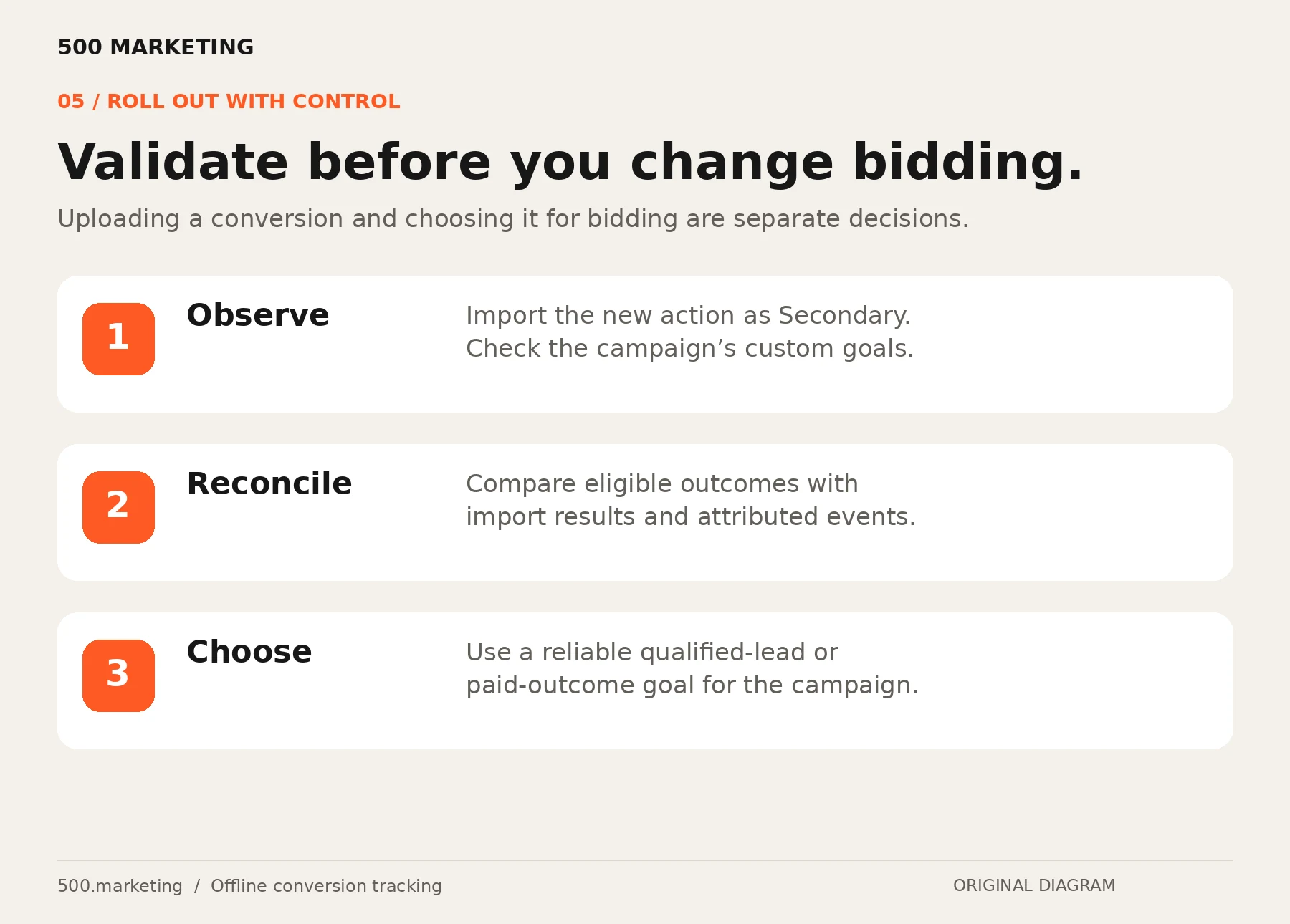
Use one deliberate funnel stage for the acquisition objective rather than indiscriminately bidding to click, enquiry, booking and payment together. If paid events are rare or heavily delayed, a well-defined qualified lead may be a more usable interim signal. Do not make up a universal minimum event count. Review your actual volume, conversion lag and stability.
Step 11. Review outcomes and repair exceptions
| Symptom | What to check |
|---|---|
| No click ID saved | Auto-tagging, redirects, consent, persistence and website-to-record integration. |
| Reference missing from chat | Static button, edited message, failed save, different device or chat abandonment. |
| Imports rejected | Field mapping, data types, action selection, permissions and timestamps. |
| Rows received but not attributed | Genuine supported identifiers, match eligibility, conversion window and processing time. |
| Duplicate conversions | Retries with changed timestamps, repeated event creation or parallel import sources. |
| Paid value too high | Deposits plus final balances counted twice, repeat visits, currency or refund treatment. |
For an already imported event that is later refunded or cancelled, use the supported conversion-adjustment process. Deleting the row from your Sheet is not a retraction. A stable order ID helps you identify the original event.[11]
Step 12. Measure business impact
Review these metrics together, using consistent date ranges and lead cohorts:
- Cost per qualified lead: ad spend divided by attributed qualified leads.
- Cost per paid acquisition: acquisition spend divided by attributed first paid customers.
- Enquiry-to-booking rate: bookings divided by actual enquiries, not button clicks.
- Attendance rate: attended appointments divided by booked appointments in the relevant cohort.
- Collected revenue: net of the refund and tax policy you defined.
- Tracking coverage: reliably linked eligible outcomes divided by eligible outcomes in your ledger.
Treat a zero denominator as “not available”, not zero cost. Separate matching improvements from genuine changes in business results: better tracking can initially change reported conversion counts even if actual demand is unchanged.
Illustrative Dubai spa walkthrough
A visitor clicks a Google ad on 28 October. The website saves the available click ID and creates reference SPA-1042. The customer sends the pre-filled WhatsApp message, and reception links that reference to booking BKG-2048. On 29 October the customer attends and pays AED 580 at 16:10 Dubai time.
The paid event uses 2026-10-29T16:10:00+04:00 and a stable transaction ID. The next daily import submits that eligible matched event to Paid Appointment. The original enquiry remains in the ledger; it is not relabelled as the paid event.
This is a fictional workflow example, not a client result or a recovery claim. A nine-month-old campaign can also be affected by competition, offers, seasonality, website friction and staff response time. Inspect those factors alongside tracking.
Frequently asked questions
Do I need a paid CRM or the WhatsApp Business API?
Not for a small manual pilot. A private ledger and disciplined reception updates can work. Automated incoming-message processing requires an appropriate integration, and an automated offline import still needs a correctly configured source connection.
Can I upload all past WhatsApp contacts and call that tracking?
No. A contact list does not establish which ad generated a paid appointment. Historical outcomes need supported matching data and must fall within applicable import and conversion windows. Missing lead-to-click links cannot simply be reconstructed from a name or a guessed campaign.
Can I send outcomes using an old Google Ads API tutorial?
Check the current route first. Google has restricted new legacy UploadClickConversions usage from June 2026 and directs new integrations towards the Data Manager API. This guide uses the Data Manager interface rather than shipping an old API script.[14]
Will this fix every declining Google Ads campaign?
No. It repairs a measurement and feedback gap. Campaign structure, demand, landing-page experience, staff follow-up and the underlying offer still matter.
What should my team do every day?
Reception completes outcome updates before the import cutoff. The integration owner checks the feed and failed runs. The marketing owner checks attributed outcomes, unusual changes and campaign goals. Escalate unmatched references rather than inventing an attribution.
How long after the ad click can I import an offline conversion?
For a conversion matched by Google click ID (GCLID), Google allows the import up to 90 days after the click. Conversions matched with customer data for enhanced conversions can be imported up to 63 days after the conversion. Record outcomes promptly, because a slow reception process can push a paid appointment outside the window.[10]
What happens if I import the same conversion twice?
Google removes a duplicate when the click ID, conversion name and conversion time all match, and only the first one counts. That is why event times must stay frozen when you retry an import. To record two genuinely separate conversions for the same click, each needs its own timestamp.[10]
Can I change or cancel a conversion after importing it?
Yes, through conversion adjustments rather than by deleting the row in your Sheet. You can restate a value or retract a conversion for up to 55 days after it was first recorded, and a retracted conversion cannot be adjusted again.[10][11]
How soon do imported conversions appear in Google Ads?
It is not instant. After creating a new conversion action, Google advises waiting four to six hours before the first upload, and uploads made during that window can take up to two days to appear in reports. Compare your report with the import results, because some rows may be rejected.[2][10]
Why was my offline conversion rejected?
Common causes are a conversion time earlier than the click time (check your time zone), a click ID older than 90 days, a click that is still being processed, or a click ID whose letter case was changed. Google’s error list shows which one applies. Correct the cause, then import the row again.[2][10]
Should I use GCLID import or enhanced conversions for leads?
If your website collects an email address or phone number, Google recommends enhanced conversions for leads where eligible. If people go straight to WhatsApp without a form, the click-ID route in this guide is the practical starting point. Neither guarantees every customer will match, and you can combine them where your data supports it.[2][7]
Can I use this setup for a medical or aesthetic clinic?
Check eligibility first. This guide’s example is a non-medical service, and enhanced conversions cannot measure prohibited sensitive-category conversions, including purchases of medical services. Review Google’s customer data policies and your consent obligations before sending any clinic outcome data.[12]
Want the tracking connected properly?
500 Marketing can help review your lead journey, define the right conversion outcome and plan the implementation across your website, booking process and Google Ads account. Our custom web development and AI automation work covers the lead capture and reception workflow.
Get the free Starter KitBook a tracking audit
Implementation guidance checked against the official resources below on 28 October 2026. Interface labels and available integrations can change.
Official setup references
- Auto-tagging
- Set up offline conversions using GCLID
- Qualified and converted leads
- Google Sheets connector
- Prepare data for Data Manager
- Connect a data source
- Enhanced conversions for leads
- GTM enhanced-conversions setup
- Primary and Secondary conversion actions
- Offline conversion import FAQs
- Conversion adjustments
- Customer data policies
- WhatsApp pre-filled messages
- Offline upload API migration